Go and see
for yourself.
A user research and usability testing platform for fast, AI-assisted studies grounded in real participants.
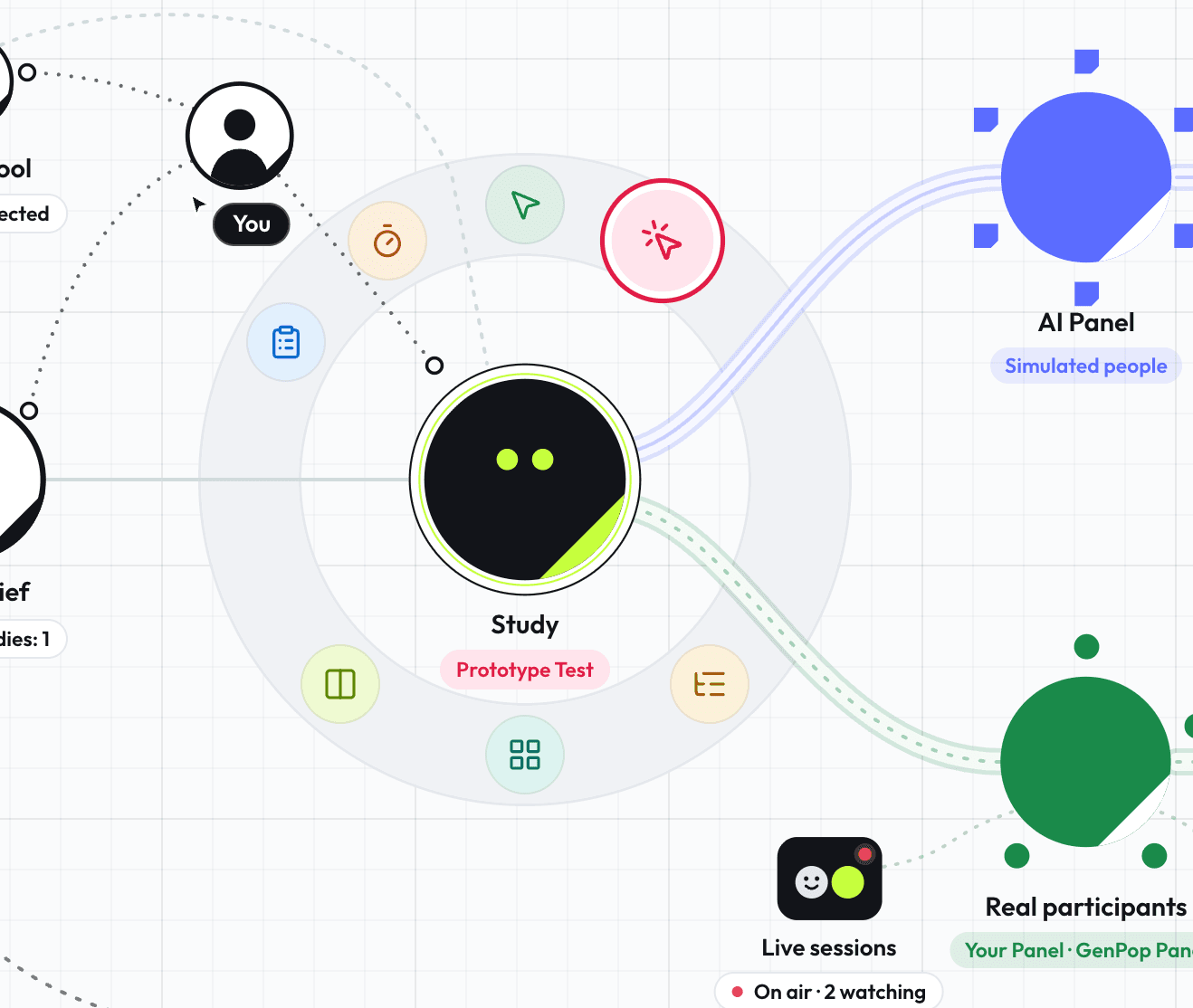
The parts of the lab:
- You
- Study Brief
- Study (Sage)
- Research methods: Survey, 5-Second Test, First-Click Test, Prototype Test, Tree Testing, Card Sorting, Preference Testing
- AI Panel: Simulated people
- Real participants: Your Panel, GenPop Panel
- Pulse: Good, Watch or Needs work, for each panel
- Findings
- Live sessions: booked with a link, watched from an observation room
- Incentives
- Your AI tool: MCP connected
- Project: Checkout redesign
- Where visitors are dropping in from: California, Virginia, Iowa, Oregon, Washington, Indiana, Pennsylvania, Changhua County, Taiwan, District of Columbia
The Approach
Genchi Genbutsu
現地現物 · Go and see for yourself.
AI output is a hypothesis. An early starting point that tells you where to look next, never mistaken for the real thing. Use an AI panel to look first. Validate with real people before you ship.

How it works
Form a hypothesis
Run any test with an AI panel of simulated people, built from your own participant model.
What's inside
Built to go and see.
Methods, participants, and results.
Research Methods
From a quick survey to full task flows, pick the method that fits what you're testing.
Survey
Ask exactly what you need to know.
5-Second Test
First impressions and recall.
First-Click Test
Validate the obvious next move.
Prototype Test
Task-based walkthroughs.
Tree Testing
Validate findability.
Card Sorting
See how people group and label your content.
Preference Testing
Compare directions side-by-side.
Moderated Sessions
Live interviews and moderated usability tests, run by you while your team watches from the Observation Lounge.
Participants
Start with the AI Panel's simulated people, then validate the first read with real participants.
AI Panel
Results from the simulated people you design.
Your Panel
A reusable roster of participants you recruit.
GenPop Panel
Screened participants, sourced for you.
Screening & Quotas
Open or invite-only links, with an auto-closing response target.
Session Scheduling
Booking links for live sessions. Participants pick a time, and confirmations and reminders are sent for you.
Results & Analysis
Completion rates and themes across every response, organized and easy to scan.
Task Success
Completion, drop-off, and steps to target.
First Impressions
Recall and sentiment at a glance.
Source-Labeled Results
Simulated people and real participants, always distinct.
Response Analysis
Spot themes across what people say.
MCPNew
Plan, run and read studies from the AI tool you already use.
MCPNew
Use it from your AI tools
Plan, run and read your research from the AI tool you already use. Connect on any plan.
Learn morePlan a five-second test for our new pricing page and run it with 20 people.
Done. I drafted the study and queued the AI Panel run with 20 simulated people. The draft is in your workspace.
Pricing page, first impressions
5-Second Test
Pricing page screenshot · shown for 5 seconds
AI Panel
20 simulated people · run queued
Questions we get a lot.
What is User Sage?
User Sage is a user research and usability testing platform. Plan a study, run it with simulated people for a fast first read, then validate it with real participants. Briefs, responses, recordings, and findings stay together in one project, so a decision and the evidence behind it never get separated.
Do I need my own participants?
No. Start with the AI Panel, whose simulated people take the study as soon as you run it. When you need real people, invite your own through Your Panel (your customers, your list, your community) or let GenPop Panel source screened participants for you. Most teams use both: simulated for the first read, real people where it counts.
Are the AI results real research?
No, and the product is built so you cannot mistake them for it. Simulated results are a hypothesis. They sit in their own column in Findings, with their own Pulse gauge checking whether the responses look realistic and varied. Real participants are the evidence. Use the AI read to decide where to look, and real people to decide what to ship.
Can I run live sessions too?
Yes. Moderated sessions are a full part of the platform, not an add-on. Share a booking link connected to your calendar, run the session while your team watches from the Observation Lounge and sends you questions as you go, and keep the recording and transcript with the session afterward. The session also keeps a record of each participant incentive, so you can see whether everyone has been paid.
What does it cost?
You can start free, with 25 credits a month, enough to run your first studies. Pro is $20 a month billed annually, with 500 credits a month, and credit packs are there for busy months. Any plan can connect over MCP. On Free, your AI tool can plan studies and list Briefs. Pro is needed to create, run, and read studies from your AI tool.
Is my data used to train AI?
No. Your studies, your participants' responses, and your recordings are never used to train AI models. The AI features work on your data only to produce your results. The full detail is on the Security page and in the privacy policy.
Get started free
Sign up any time. The product keeps changing as we build from real usage, so tell us what you find.