Watch a study run, start to finish.
User Sage is a user research and usability testing platform. This interactive example follows a Checkout redesign from Brief to decision, with simulated people, real participants and a live session. Click any part of the lab to see what it does.
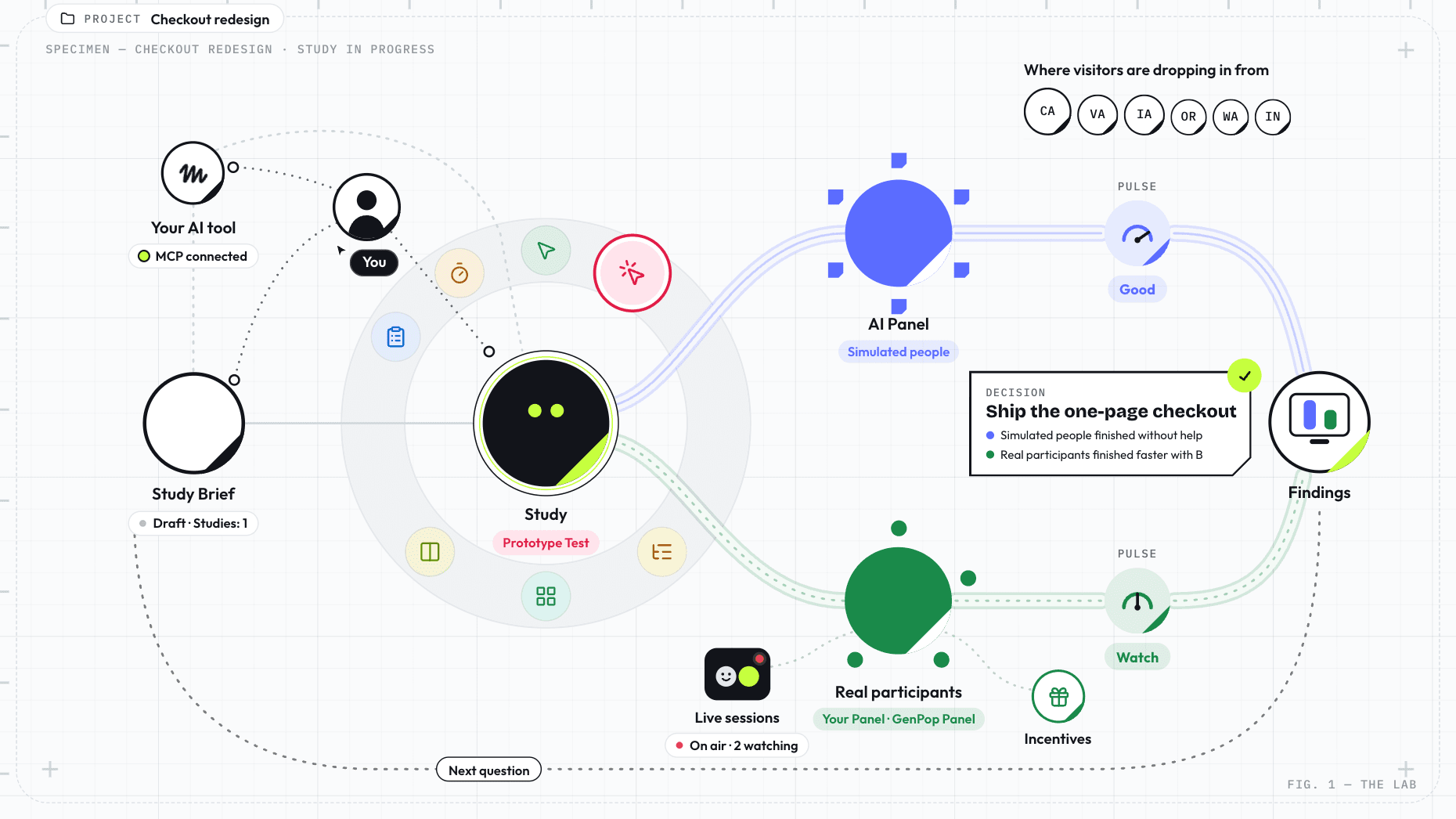
The parts of the lab:
- You
- Study Brief
- Study (Sage)
- Research methods: Survey, 5-Second Test, First-Click Test, Prototype Test, Tree Testing, Card Sorting, Preference Testing
- AI Panel: Simulated people
- Real participants: Your Panel, GenPop Panel
- Pulse: Good, Watch or Needs work, for each panel
- Findings
- Live sessions: booked with a link, watched from an observation room
- Incentives
- Your AI tool: MCP connected
- Project: Checkout redesign
- Where visitors are dropping in from: California, Virginia, Iowa, Oregon, Washington, Indiana, Pennsylvania, Changhua County, Taiwan, District of Columbia
Every study starts with a question you can’t answer yet.
Follow the Checkout redesign from the Brief to the decision.
The Brief
Tell User Sage what you need to learn. It drafts a Study Brief covering the decision, a recommended method and why, who to ask, and a study plan. Review it, edit it, then create a study from it. The two stay linked.
Why do people stall at the shipping step?
Create the study
For the Checkout redesign, a First-Click Test on the new shipping screen is a good first look. There are seven methods to choose from, and you can combine them in one study.
Incentives
Real participants give you their time. Set an incentive for the study and track it for each person, from promised to given.
Simulated people for a first read. Real people for evidence.
AI Panel
Built from your participant model. Tested on your real screens.
The Sage Engine builds each simulated person from your participant model, with their own habits, limits and patience. Each works through the shipping screen on their own, clicking and explaining what they see. Treat the result as a hypothesis to test with real people, not a finding.
Real participants
Your own people, or screened ones found for you.
Give real people the same task. Invite your own through Your Panel, or let GenPop Panel find screened participants. Their responses are the evidence you test the simulated read against.
Each panel gets its own Pulse gauge (Good, Watch or Needs work) and its own column in Findings. Pulse checks whether responses look realistic, varied and consistent, not whether they are true. You always know which result came from where.
Or run a live session, with your team watching.
The best follow-up questions come up in conversation. Moderated sessions are the live kind of research, run by you in real time: a moderated usability test when there are tasks to walk through, or an open user interview when you need to hear how someone thinks.
Schedule it
Connect Google Calendar, set your availability, and share a booking link. Participants pick a time and get a confirmation and reminders. The session lands on your calendar with a Meet link.
Run it live
You lead the call while your team watches in the Observation Lounge, follows the live transcript, and tags the moments that matter. They send you questions as you go.
I didn’t see the shipping cost until I hit Pay.
Keep the recording
The session is recorded with the participant’s consent. Afterward, the recording and transcript stay with the session, so the team can revisit what was said and shown.
Decision
Lead with the Pay button
End with a decision the team can act on.
Findings keeps simulated and real results in separate columns, with takeaways and a written summary. The Brief, the studies and Findings stay linked in a Project, so anyone can trace the decision back to the evidence. Share it with one link.
Seven ways to ask.
Each method can run with simulated people, real participants, or both. Every example below uses the Checkout redesign.
Survey
Ask questions, and show a design when it helps.
What do people expect to pay for shipping before they see a price?
Learn more
5-Second Test
Show a design for five seconds, then ask what people noticed and remember.
Does the order total register at a glance?
Learn more
First-Click Test
Give people a task and see where they click first. It shows whether the page points them in the right direction.
Can people find Pay without hunting for it?
Learn more
Prototype Test
Give people a task and watch them work through a prototype, click by click.
From cart to confirmation, where do people hesitate?
Learn more
Tree Testing
Give people a task and watch them navigate a text-only site structure by label alone.
Where do people look for delivery times?
Learn more
Card Sorting
Give people a set of items and see how they group and label them.
How would people group the help topics around paying?
Learn more
Preference Testing
Show 2 to 5 design options and ask which one people prefer, and why.
Which payment step do people trust more, the current one or the redesign?
Learn more
The seven methods run inside a study. When the research calls for a live conversation instead, moderated sessions are scheduled and run separately.
Or build your own.
Start with a blank study and combine methods in any order: Survey questions about shipping costs, a First-Click Test on the new screen, then Tree Testing to see where people look for delivery times.
Questions we get a lot.
What are Simulated people?
Simulated people are AI-generated participants the Sage Engine builds from a participant model you define. They give you a fast first read on a design or a question. Their answers are a hypothesis, not evidence.
Are AI results and real results mixed together?
No. Each gets its own Pulse gauge and its own column in Findings. Pulse checks whether responses look realistic, varied and consistent, not whether they are true.
Which research methods can I use?
Seven: Survey, 5-Second Test, First-Click Test, Prototype Test, Tree Testing, Card Sorting and Preference Testing. You can combine several methods in one study. Moderated sessions run separately.
How do moderated sessions work?
Moderated sessions are how you run live moderated usability testing and user interviews in User Sage. Connect Google Calendar, set your availability and share a booking link. Participants pick a time and get a confirmation and reminders, and the session lands on your calendar with a Meet link. You lead the session while your team watches in the Observation Lounge and sends you questions. The recording and transcript stay with the session.
How do I connect my AI tool?
User Sage connects over MCP (Model Context Protocol). Generate a key in workspace settings, add it to Muse, Grok Bot, Claude, Cursor or VS Code, and plan and run studies and read findings from chat. Each tool has a setup guide.
Can I start for free?
Yes. Sign up and start your first study for free.
Bring the question you’re stuck on.
Start free and put your first study in front of simulated people or real participants today.
Genchi genbutsu: go and see for yourself. You have watched a study run.